Animation classes reference
Everything this plugin's panels do comes down to plain CSS classes applied to an element — the panels are just a friendly way to write them (see Getting started). This page is for the opposite direction: if you already know which class you want (reading someone else's markup, writing a class by hand in a code block, or searching for it with Yabe Bricks Plain Classes), here's what each prefix means and where its full documentation lives.
| Prefix | Family | Full reference |
|---|---|---|
fb-anim-- | Entrance | Entrance animations |
fb-anim--text- | Text | Text animations |
fb-hover-- | Hover | Hover animations |
fa-- | ScrollTrigger (including fa--iparent, fa--parent, fa--reverse, the fa--NN trigger-percent classes, fa--no-mobile, fa--no-tablet) | ScrollTrigger animations |
fa--mouse- (fa--mouse-follow, fa--mouse-move, fa--mouse-3d, fa--mouse--bounce, fa--mouse-3d__inner) | Mouse | Mouse animations |
fa-radial-bg / fa-radial-bg-- | Gradient background | Background animations |
The authoritative, always-current list is the class list the plugin itself ships with
(build/builder-selectors.json in the plugin's files) — this table is a map of the prefixes, not
a copy of every individual class name, since those are already listed in full on each family's own
page.
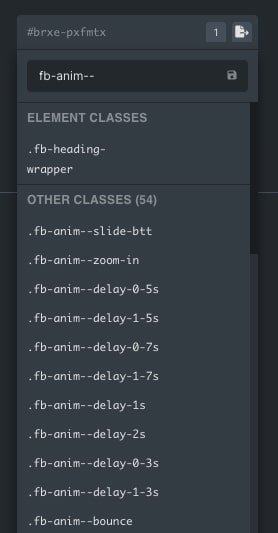 In Bricks, typing a prefix such as
 fb-anim-- in the class field lists the matching classes.
Video walkthroughs
These three videos are from version 2.0 (July 2024) and add every animation by typing classes by hand. It still works, but it's the slow, error-prone method: today you get the same result by picking options in your builder's panels, with no class names to remember. Start with Animation families, and use these videos only if you already work with classes.