Background (gradient & patterns)
An interactive radial gradient background whose light follows the pointer, with an optional pattern layered on top — a grid of dots, a net, diagonal lines or diamonds — that can also drift slowly in a loop. Use it on sections and large containers.
Needs the Gradient background module turned on in Animation settings first.
The gradient paints outward from a focus point that eases toward wherever the pointer currently is, and stays wherever the pointer last was once it leaves. It starts centred.
See it live: Gradient background animations on fancyanimations.com.
Settings
| Setting | Effect |
|---|---|
| Gradient background | Turns the effect on (required for everything else) |
| Pattern | None, net, dots, diagonal lines, or diamonds |
| Animate pattern | Makes the chosen pattern slowly drift in a loop |
Only one pattern per element — the pattern itself is drawn behind the element's content.
Variables you can set
| Variable | Default | Controls |
|---|---|---|
| Background colour | #1F1F33 | The outer gradient colour |
| Focus colour | #2D2D76 | The colour at the pointer's position |
| Gradient size | 60vw | The radius of the gradient |
| Pattern colour | #ffffff | Colour of the pattern lines/dots |
| Pattern size | 30px | The size of each pattern cell |
| Pattern opacity | 0.1 | How visible the pattern is (0–1) |
| Dot size | 1px | Radius of each dot (dots pattern only) |
| Drift X / Drift Y | 100%, 100% | How far the pattern drifts per loop (0%, 100% or -100%) |
| Drift duration | 20s | How long one drift loop takes |
- Bricks
- Etch
- Gutenberg
Available on Section, Container, Block and Div elements: Style tab → Gradient background animations. All the variables above are native colour/size/number controls in the same panel.
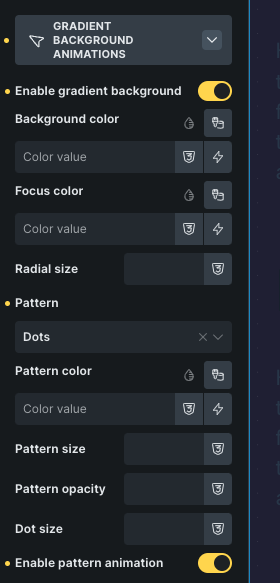 The gradient background panel in Bricks.
Add the classes from the Fancy → Gradient panel, which writes the variables as inline styles on the element for you.
With the module on, the block sidebar's Gradient Background panel has the enable toggle, pattern choice, drift toggle, and every variable above as its own field.
Video walkthrough
Common problems
- The gradient doesn't show at all. The element already has its own background colour, image or gradient set elsewhere, which overrides the plugin's background entirely. Remove it and use the Background/Focus colour variables instead.
- The pattern is missing, or your own
::beforedecoration on the same element breaks. Both the pattern and a lot of decorative techniques use the element's::beforepseudo-element — move your own decoration to a child element instead. - The element now stacks oddly above or below its neighbours. Turning this on sets
position: relative; z-index: 1on the element. Set whatever z-index you actually need explicitly. - The pattern is too strong, or invisible. Default opacity is 0.1 and the default pattern colour is white — on a light background, set the pattern colour dark instead.