Entrance animations
An entrance animation plays once, the moment an element scrolls into view — unlike scroll trigger, it isn't tied to the scroll position after that, it just fires and plays through. This is the classic "fade up as you scroll down the page" effect.
Until it fires, the element is hidden; after it finishes playing, it stays in its final, normal state. To make the animation cascade across several children one after another instead of animating a single element, see Stagger children.
See it live: Entrance animations on fancyanimations.com.
Animations
Subtle choices for ordinary body text: Fade in, a soft slide, or Blur. Save zoom, bounce, rotation, sweep and the always-on Ken Burns/ring/border effects for hero visuals, icons, badges and section dividers — not for paragraphs.
| Animation | What it does |
|---|---|
| Fade in | Opacity only |
| Slide (4 directions) | Moves in from 90% of its own size away; a softer variant moves only 50% |
| Slide — relative (4 directions) | Same idea using top/bottom/left/right instead of transform |
| Zoom in / Zoom out | Scales in from much smaller / much larger than normal size |
| Bounce / Bounce 200px | Drops into place from above, settling with a bounce |
| Rotate (centre, horizontal, vertical, two diagonals) | One full turn into place |
| Blur | Comes into focus from a heavy blur |
| Flicker | A brief opacity flicker on entry |
| Sweep (4 directions + 2 centre variants) | Revealed through a moving clip, like a wipe |
| Circle reveal (centre + 4 corners), Circle convert | A circular reveal |
| Fan (left/right/centre top/centre bottom) | A fan-shaped clip reveal |
| Ken Burns (7 directions) | A slow, continuous zoom — always visible, keeps running after it "finishes" |
| Ring (4 palette colours × 3 sizes) | A colour ring pulses outward once — always visible afterwards |
| Border (4 palette colours) | A rotating gradient border, running continuously from page load — always visible |
| Custom | Nothing by itself — write your own @keyframes (see below) |
Ring and Border colours come from the site's animation colour palette.
Options
| Setting | Effect |
|---|---|
| Duration | How long the animation takes. Site default: 1 second |
| Delay | How long it waits before starting. Site default: no delay on new installs — time the entrance with the trigger point below instead of guessing with a wait |
| Trigger point | Fires once the element's reference edge is that % of the viewport height above the bottom of the screen; empty fires as soon as any part shows |
| Fully visible (reference = bottom edge) | Fires only once the element's bottom edge has entered the screen, instead of its top |
| Reset below the trigger line | Resets the animation if the element scrolls back below the trigger line, not only when it leaves the screen entirely |
| Only once | Plays the first time only, ever, for that visitor's session |
| Loop | Repeats forever, alternating direction — delay is forced to 0 |
| Elastic | An overshooting, springy easing instead of the normal curve |
| Disable from tablet / mobile | Shows the element's final, settled state at ≤991px / ≤767px instead of animating it |
A rule of thumb for the trigger point, by element size: icons, buttons and badges — "fully visible" with a trigger around 10%; images, cards and headings — 20–30%; large containers — 40–50%. "Fully visible" means the bottom-edge reference, not simply a high percentage.
How repeats work
| Setup | Plays |
|---|---|
| Default | Every time the element re-enters the screen (resets once it's fully left) |
| "Reset below the trigger line" on | Also resets while still visible, if it scrolls back below the trigger |
| "Only once" on | Once per page load, for that element |
| Site setting "Play entrance animations once" | Once, for every entrance animation on the site |
| Site setting "Only on scroll down" | Plays scrolling down; resets only when scrolling back up |
Custom animations
With Custom chosen, the element simply stays hidden until it's triggered, then gets an "active"
state class. Write your own animation-name (not the shorthand animation property) on that
active state — duration, delay and "stay in the end state" still come from the Duration/Delay
settings above:
.card.fb-anim--custom-active {
  animation-name: card-pop;
  animation-timing-function: cubic-bezier(.34, 1.56, .64, 1);
}
@keyframes card-pop {
  from { opacity: 0; transform: scale(.7); }
  to   { opacity: 1; transform: none; }
}
- Bricks
- Etch
- Gutenberg
Style tab → Entrance Animations. Add one animation (it's possible to layer a second via custom
CSS, but one is the normal case), then the Duration/Delay/Trigger/reference/reset/once/loop/
elastic/tablet/mobile options in the same panel. Custom CSS for a Custom animation goes in the
element's own custom CSS, targeting %root%.fb-anim--custom-active.
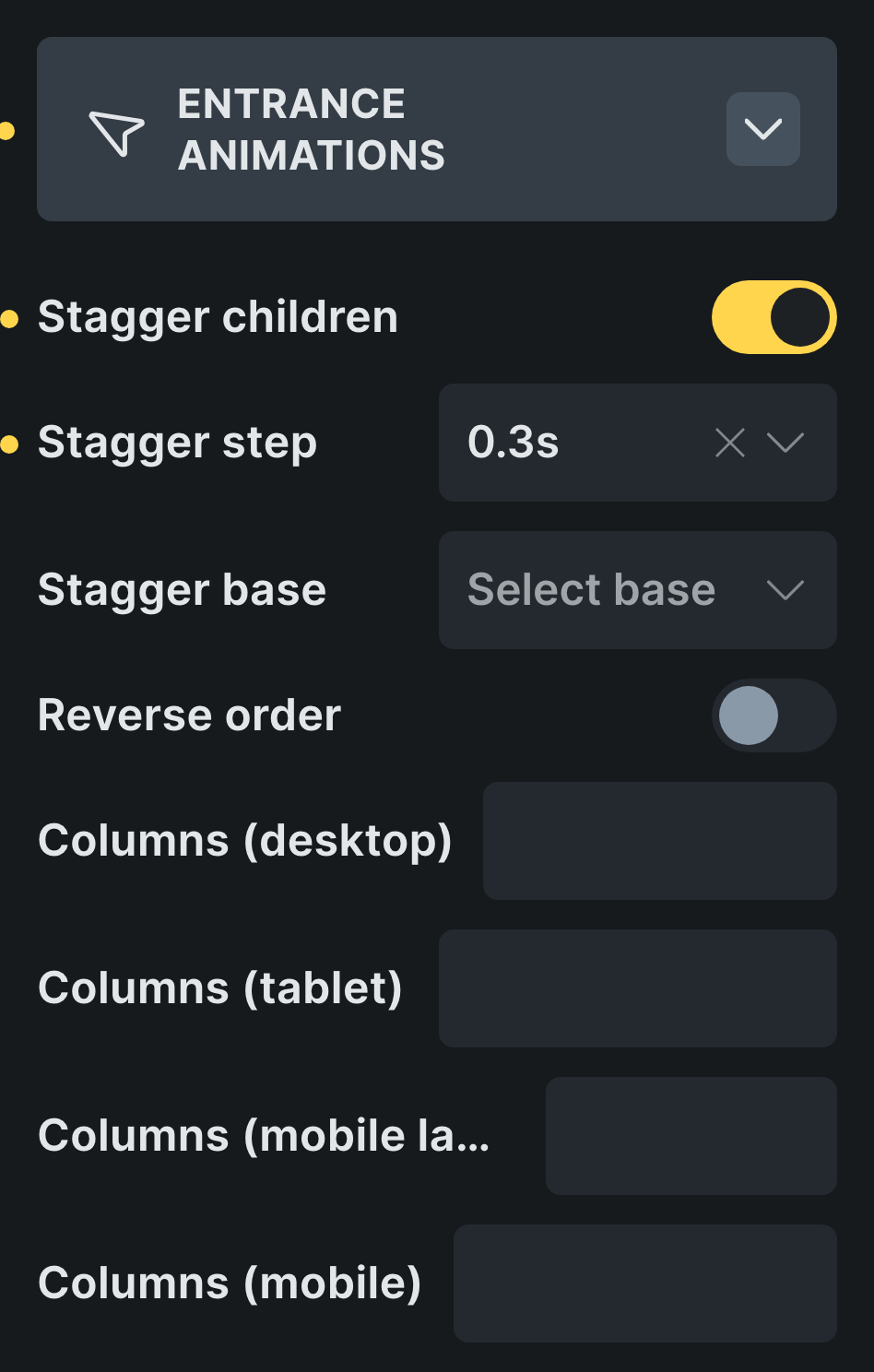 The Entrance Animations panel in Bricks, with Stagger children at the bottom.
Inside a Bricks native slider, entrances play when a slide becomes active and any delay is ignored.
Add the classes to the element from the Fancy → Entrance panel. To override a built-in
animation's distance or colour, set the relevant CSS variable (see below) either directly in the
element's style attribute, or on a more specific selector such as .hero-title.fb-anim--slide-btt.
A @keyframes rule written inside an Etch class used to be silently dropped by the browser —
Etch places a class's CSS inside the class rule itself, where @keyframes isn't valid. Put it in
a separate Style Manager stylesheet instead on sites before 3.2.0; from 3.2.0 on, keyframes written
inside a class work directly (see Animation settings).
Needs "Gutenberg blocks (Beta)" turned on first (see Animation settings). Then, in the block sidebar's Fancy Entrance Animations panel: turn on the module, pick an animation and the same Duration/ Delay/Trigger options as above. There's no Elastic option here. Because the classes are saved directly into the block's HTML, a dynamically/server-rendered block won't carry them — wrap it in a Group block and animate that instead.
For developers: CSS variables you can override
Set these on the element itself, with a selector a little stronger than the plain animation class:
| Variable | Affects | Default |
|---|---|---|
--slide-btt, --slide-ttb, --slide-ltr, --slide-rtl (and -s soft variants) | Slide distance | 90% / 50% of the element's own size (relative variants: 250px, 100px, ±50%) |
--fa-bounce | Bounce drop distance | 90% / 200px |
--kenburns-{direction}-start, --kenburns-{direction}-end | Ken Burns zoom range | 1 → 1.2 |
--fa-border-radius, --fa-border-size, --fa-border-bg | Border animation shape and the fill behind it | 0px, 2px, white |
For subtle motion on body text, 10–20px of slide distance reads much better than the full default.
Video walkthrough
Common problems
- The element never appears at all. It only has timing classes (duration/delay) without an
actual animation name — it's stuck at
opacity: 0. Add an animation name, or remove the classes entirely. - Entrances stay invisible until the visitor clicks or scrolls. A "delay JavaScript" performance optimisation is holding back the plugin's own observer script. Exclude the plugin's frontend observer script from any JS-delay optimisation.
- The element is briefly visible, then jumps before it animates. It has its own
opacity(orvisibility/display) set somewhere else — in its own CSS, or a builder control — which overrides the plugin's hidden starting state. Move that styling to a child element instead; an element with an entrance (or a stagger child) should carry no opacity of its own. - A centred or rotated element jumps out of place right after it animates. Transform-based
animations end on
translate(0)/scale(1)and stay there (they "fill forwards"), overwriting any transform you'd set yourself. Put the animation on a wrapper instead. - A shadow, or content near the edge, gets clipped after a sweep/circle/fan animation. The
animation's final
clip-pathstays applied afterwards. Animate a wrapper that has no shadow or near-edge content of its own. - The "border" animation turns the whole background white. It fills the element with
--fa-border-bg(white by default) so the spinning ring has something to sit on. Set--fa-border-bgon the element to your own colour, ortransparent, with a selector stronger than the animation class. Before 3.2.0 the white was fixed: overridebackgroundinstead. - Something at the very top of the page animates in visibly late. If you (or a site that updated from an earlier version) set the site's default delay above 0, elements already on screen at load still fire with that wait. Don't use entrance animations there, or add "No delay".