Mouse animations
Mouse animations make an element lean, drift or tilt in 3D as the pointer moves over it, easing back to rest the moment the pointer leaves. They're desktop-only in practice — there's no pointer position to follow on a touch screen.
Needs the Mouse module turned on in Animation settings first. Without it, the classes do nothing at all.
See it live: Mouse animations on fancyanimations.com.
Animations
| Animation | Effect |
|---|---|
| Mouse follow | Moves toward the pointer (about a quarter of the distance from the element's centre) and tilts slightly |
| Mouse move | The same movement, with no rotation |
| 3D tilt | Tilts in 3D following the pointer — the plugin automatically wraps it in a perspective container |
| Bounce (add-on) | A springy, overshooting transition — combine with one of the effects above |
| Inner layer (on a child of a 3D tilt element) | Floats that child forward for a sense of depth |
Use only one of Follow / Move / 3D tilt per element. Good on hero images, decorative shapes and cards; avoid it on plain text or whole sections full of content — it reads as noisy at that scale.
For developers: CSS you can tune
The runtime writes --fa-mouse-x, --fa-mouse-y (and --fa-mouse-r for Follow) continuously;
override the strength factors with a selector a little stronger than the plain class:
.hero-shape.fa--mouse-move {
  --fa-factor-x: calc(0.1 * 1px);
  --fa-factor-y: calc(0.1 * 1px);
}
A 3D card with a layer that floats above it:
div.card      3D tilt
  img         Inner layer
  h3
- Bricks
- Etch
- Gutenberg
Style tab → Mouse Animations: pick Follow, Move or 3D tilt, then optionally "Bounce" and, on a child element, "I am inner" for the floating-layer effect. Factor overrides go in the element's custom CSS.
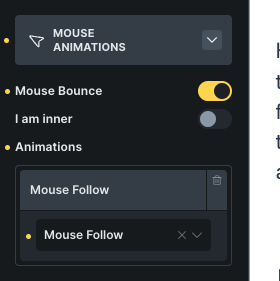 The Mouse Animations panel in Bricks.
Add the classes from the Fancy → Mouse panel. Factor overrides fit directly in the element's
style attribute.
With the Mouse module on, the block sidebar's Mouse Animations panel has the same Follow/ Move/3D tilt choice, plus Bounce and the inner-layer toggle.
Common problems
- An entrance, scroll animation or your own transform suddenly stops working on that
element. Mouse animations set
transform(and their own transitions) directly, overwriting anything else that was also writingtransform. Put the mouse effect on a wrapper or child instead. - A grid or flex layout breaks specifically on an element with 3D tilt. The plugin wraps that element in its own container to get the right perspective, which pulls it out of being a direct child of the grid/flex parent. Put the 3D tilt class on something inside the grid item instead of on the grid item itself.
- The inner floating layer doesn't visibly pop out. It must be a direct child of the 3D tilt element, or every element in between also needs 3D transforms preserved.
- Hovering the element skips its entrance animation. Entering an element that also has an entrance animation stops that animation and shows it finished. Put the entrance on a wrapper and the mouse effect on the child.