Text animations
Text animations split a heading or short line of text into letters, words or lines, then animate each piece in — one after another — the moment the text scrolls into view. Use it on headings and short labels, one paragraph at most; it isn't meant for body copy.
This needs the Text module turned on in Animation settings first. Without it, nothing splits the text and it stays static — even if you've already added classes or attributes to it.
A text animation fires like an entrance animation (same trigger point, delay, "only once" and repeat behaviour as Entrance animations) — but it isn't the same thing. Don't add both an entrance and a text animation to the same element.
See it live: Text animations on fancyanimations.com.
Animations
Each split piece starts in the state below, and animates to its normal, readable state.
| Animation | Each piece starts |
|---|---|
| Fade | Transparent |
| Blur | Blurred |
| Focus | Blurred, small and pushed back |
| Slide up / Slide down | Below / above its normal position |
| Slide up/down + rotate | Offset and rotated 75° |
| Zoom in / Zoom out | Scaled down to nothing / scaled up large |
| Flip X / Flip Y | Flipped 180° on that axis |
| Skew left-to-right / right-to-left | Skewed 45° and offset |
| Rotate left-to-right / right-to-left | Rotated 120°, scaled to nothing |
| Swing 3D | Swung back 90° from its top edge |
| Wave | Scaled to nothing, overshoots past full size before settling |
| Clip reveal | Clipped from below |
| Typewriter | Hidden, appears instantly (works best split by letters) |
| Overlay reveal (4 palette colours) | Covered by a solid colour bar that slides away — always splits by line, regardless of the split-mode setting |
Splitting the text
| Split mode | Pieces | Gap between pieces |
|---|---|---|
| Letters (default) | Individual letters | Roughly 3% of the duration (slightly more between words) |
| Words | Whole words | Roughly 14% of the duration |
| Lines | Visual lines, re-measured on resize | Roughly 14% of the duration |
Lines mode needs both the "per line" and "per word" settings together internally — the panels handle this for you. Each individual piece animates over one third of the total Duration; the Delay setting is the wait before the very first piece starts.
Example — a hero subtitle revealed word by word:
h2 "Slide up" animation · split by words · no delay · trigger 20%
Options
Same fields as Entrance animations: Duration (default 1s), Delay (no delay by default — time with the trigger point instead), Trigger point, "Fully visible" reference, "Reset below trigger line", "Only once", Disable from tablet/mobile. There's no Loop or Elastic option for text.
- Bricks
- Etch
- Gutenberg
Style tab → Text Animations — only available on Heading, Basic text, Rich text, Text link, Button, Post title, Post excerpt, Post author and Post meta elements. Pick one animation, then the split mode (choose only one of "Split by words" / "Split by lines" — never both, and only when you actually need something other than the letters default) and the same Duration/Delay/trigger options as Entrance.
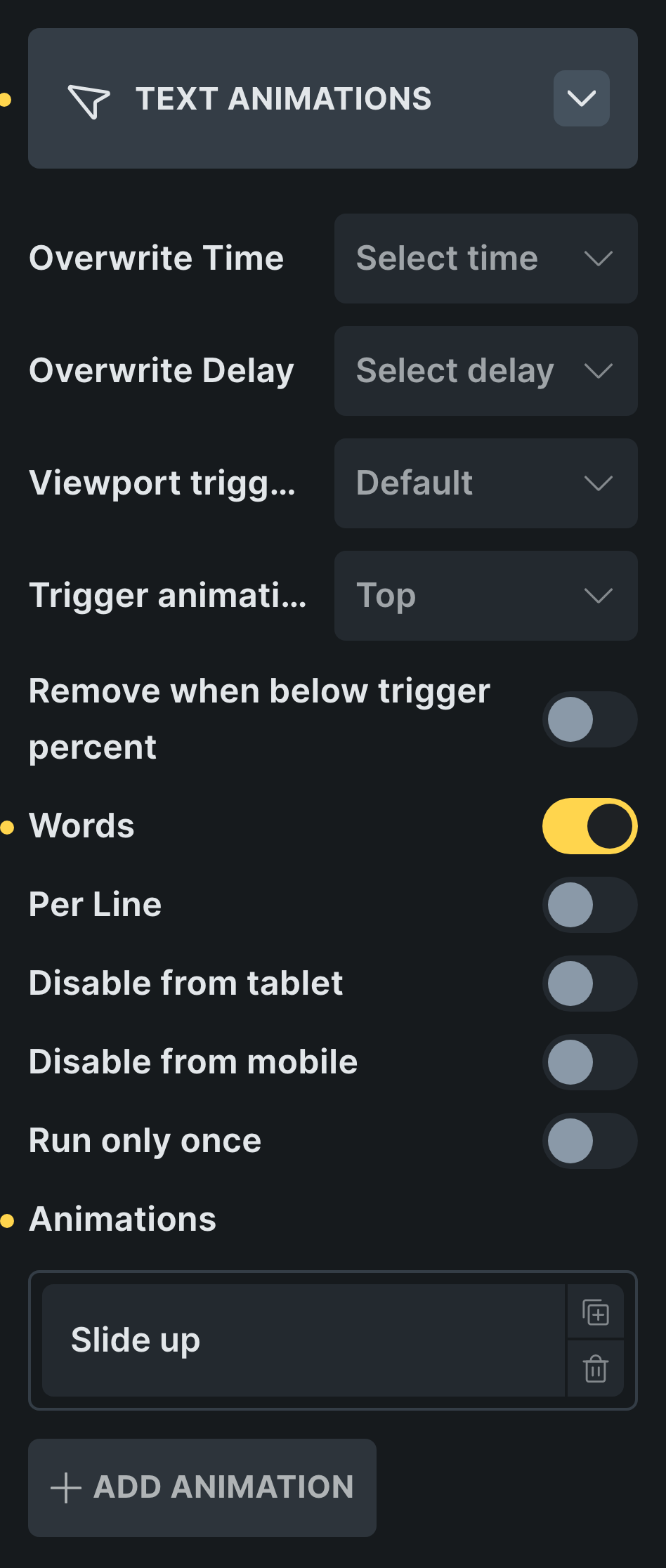 The Text Animations panel in Bricks.
Add the classes from the Fancy → Text panel. Its "Per line" option adds both the line and word split classes for you.
With the Text module on, the block sidebar's Text Animations panel appears: turn it on, choose an animation, Duration/Delay/trigger, and words/lines splitting. "Per Line" here only saves the line-split setting — the page adds the matching word-split class automatically once it actually splits the text. The editor shows a preview-layer approximation; the real split only happens on the front end.
Video walkthrough
Common problems
- Inside a pinned scene or a hero, the words have already appeared by the time the scene starts. Text animations trigger on scroll-into-view, same as an entrance — and a pinned scene or hero is already in view from the start. For a reveal that's actually driven by the scroll itself, build it with one element per word inside a "Sequence children" parent instead, each word with its own Fade + Bottom-to-top scroll trigger rows.
- Links, bold text or paragraph breaks disappear from the text. Letters and words modes keep
all of that inline markup; lines mode rebuilds the text from measured line boxes and only
keeps
<span>classes — links, bold/italic tags and paragraph breaks inside it are lost. Use letters or words mode on any text with inline links. - The heading is no longer full width, or no longer centred. Text animation classes set
display: inline-blockon the element. Setdisplay: block(or an explicit width) on it yourself. - Text is visible but never animates. The Text module is off at the site level — turn it on in Animation settings.
- A long paragraph takes forever to finish animating. Letter-by-letter mode adds up delays one letter at a time across a whole paragraph. Switch to words or lines mode, or just use a plain Fade in entrance for body copy instead.