Animation settings
In wp-admin: Fancy Animations → Animation Settings (the Animations tab). These are the site-wide defaults and modules every animation family builds on. You can't change them from inside a page: a visitor sees the same values everywhere on the site, and a value set on an element in Bricks, Etch or the block editor always wins over these defaults.
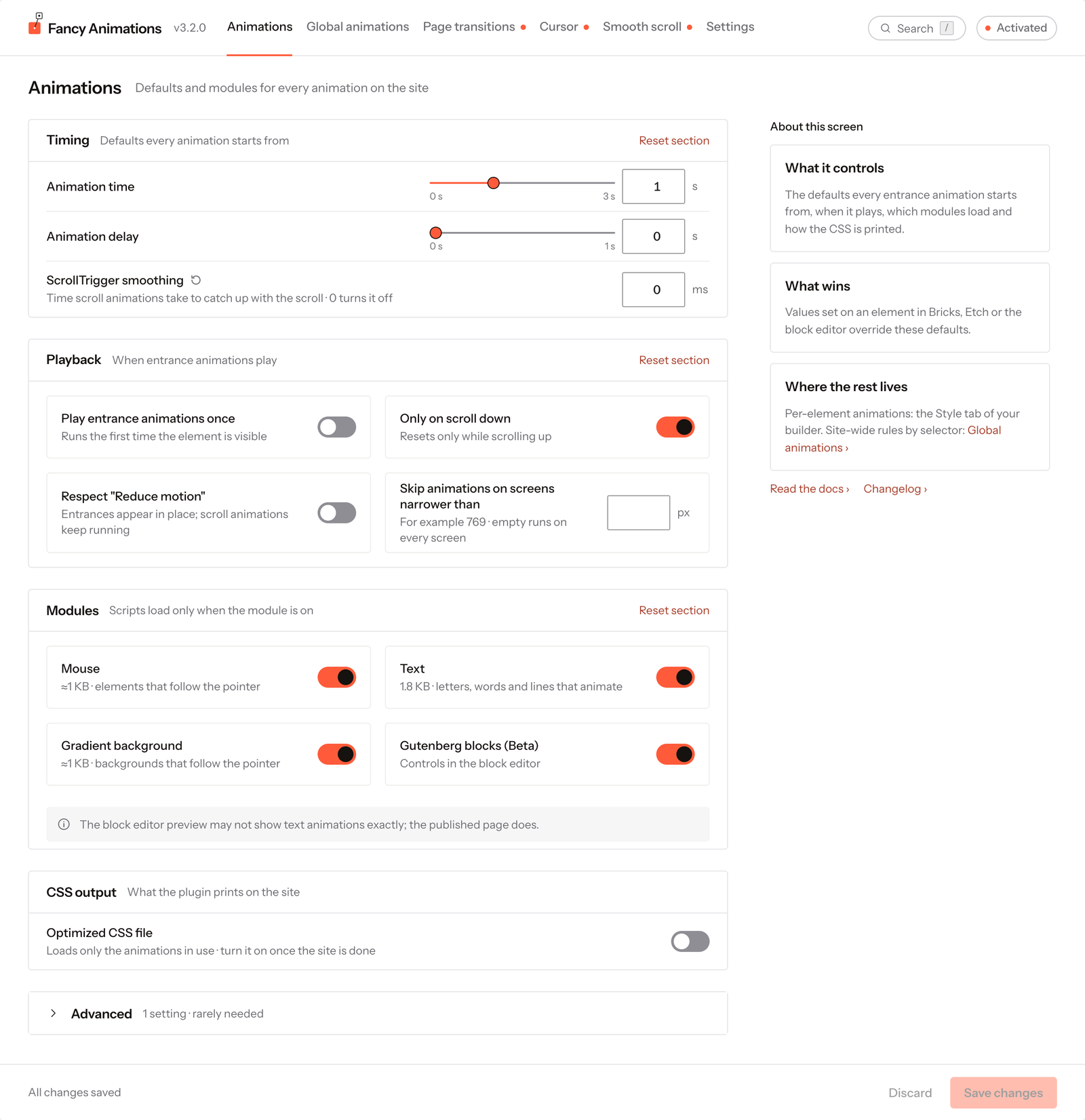
Timing
| Setting | Default | Effect |
|---|---|---|
| Animation time | 1s (0–3) | Duration of every entrance and text animation that doesn't have its own duration set |
| Animation delay | 0s on new installs (0–1) | Delay of every entrance and text animation that doesn't have its own delay set. Time an entrance with its trigger point instead of a delay: a delay only guesses when the element will be in view |
| ScrollTrigger smoothing | 100 ms on new installs (0–500 ms; 0 turns it off) | How long scroll trigger animations take to catch up with the real scroll position. Elements can override it |
Sites that updated from before ScrollTrigger smoothing existed (before 3.1.1) keep it at 0 instead of 100 ms, so a published page doesn't change its motion on its own after an update.
Playback
| Setting | Default | Effect |
|---|---|---|
| Play entrance animations once | Off | Every entrance and text animation plays only the first time it's seen, site-wide: the same as "Only once" on every element |
| Only on scroll down | Off | Animations fire scrolling down, and reset only when scrolling back up |
| Respect "Reduce motion" | Off | See Reduced motion below |
| Skip animations on screens narrower than | Empty (every screen) | Below this width, in px, the whole animation stylesheet is removed and the custom cursor turns off: entrance, text, hover and scroll presets show their static state |
Reduced motion
Off by default: until you turn it on, every visitor sees every animation regardless of their own
system preference. It only takes effect when both are true: this setting is on, and the
visitor's system asks for less motion (prefers-reduced-motion: reduce).
| Feature | With both conditions true |
|---|---|
| Entrance animations | Shown already in their final state: no movement, no delay, loops stop |
| Text animations | Every letter, word or line shown at once; overlay-reveal bars hidden |
| Page transitions | Skipped entirely |
| Scroll trigger, hover, mouse, gradient drift, custom cursor, smooth scroll | Not affected: scroll progress often decides what content is even shown, so switching it off could hide content |
Modules
Each module loads its own small script and CSS only when it's on. They're off by default, so sites that don't use them pay nothing for them.
| Module | Weight | Without it |
|---|---|---|
| Mouse | ≈1 KB | No Mouse animation controls appear, and .fa--mouse-* classes do nothing |
| Text | 1.8 KB | No Text animation controls appear, and text isn't split |
| Gradient background | ≈1 KB | No Background controls appear |
| Gutenberg blocks (Beta) | — | The Fancy panels don't appear in the block editor sidebar |
Entrance, Stagger, Hover and Scroll trigger need no module: they're always available.
CSS output
Optimized CSS file
Off by default. Turned on, the site only loads the CSS for the animation classes actually present in saved content (Bricks settings and classes, Etch and block classes, Global animations rules), rebuilt automatically shortly after each save. Pages that are still drafts, pending, private or scheduled count too, so you can preview them before publishing.
Turn this on once you've finished adding animations. A class that exists only at runtime, or one added without saving the page since, has no CSS until the next save rebuilds the cache.
This is Fancy Animations' own trimming. A performance plugin's "remove unused CSS" or "delay JavaScript" option needs Fancy Animations excluded — see Caching and optimization plugins.
Etch: keyframes inside classes
Only shown when Etch is active. On by default. Prints the @keyframes written inside an Etch
class where the browser can read them, on the page and in the builder. If Fancy Etch already does
this, the setting is shown disabled with that reason.
Advanced: animation colors
A collapsed section with one setting, Animation colors: the four palette colours used by the Ring, Border and Overlay reveal animations and the hover ring effect.
| Colour | Default |
|---|---|
| Primary | #FF5B3A |
| Secondary | #E8917A |
| White | #FFFFFF |
| Black | #15120F |
Each one takes a hex value or a CSS variable (for example var(--my-color)). Pick the variant
whose colour contrasts with the background it's used on. A variable that doesn't exist on the site
makes that variant invisible, with no error: check the name before you point a colour at it.
Related settings on other screens
| Screen | What it configures |
|---|---|
| Global animations | Rules that add an animation to every element matching a CSS selector, site-wide |
| Page transitions | The effect played between page loads |
| Smooth scroll | Lenis smooth scrolling for the whole site |
| Custom cursor settings | Style, size, colours and targeting for the site-wide custom cursor |
Common problems
- Every entrance animation waits before it starts. The site's Animation delay is above 0 (changed from the default, or a site that updated from an older version): add "No delay" per element, or set it back to 0 here.
- Headings animate that nobody set an animation on. A Global animations rule matches them: give the element its own animation (it always wins), or exclude it in the rule.
- Text, mouse or gradient background controls are missing from the builder. The matching module is off here.
- Scroll animations feel laggy on one site and snappy on another. Different ScrollTrigger smoothing values, or Smooth scroll is on in one of them.
- A new animation works while editing but not on the live site. Optimized CSS file is on and the cache predates the new class: save the page again to rebuild it.