Custom cursor settings
In wp-admin: Fancy Animations → Cursor. Replaces the system pointer on the front end with a styled cursor, site-wide. Once it's on, individual elements can customise what the cursor shows over them: see Custom cursor (per element).
The On/Off switch at the top right turns it on; it's off on a new install. The chips under the title (Shape, Colors, Behavior, Where it applies) jump to each section.
Live preview. The side column has a test area with a sample link, a sample button, text and image labels and a dark zone with the inverted colours. Move your mouse over it to try the cursor with your current settings, before you save.
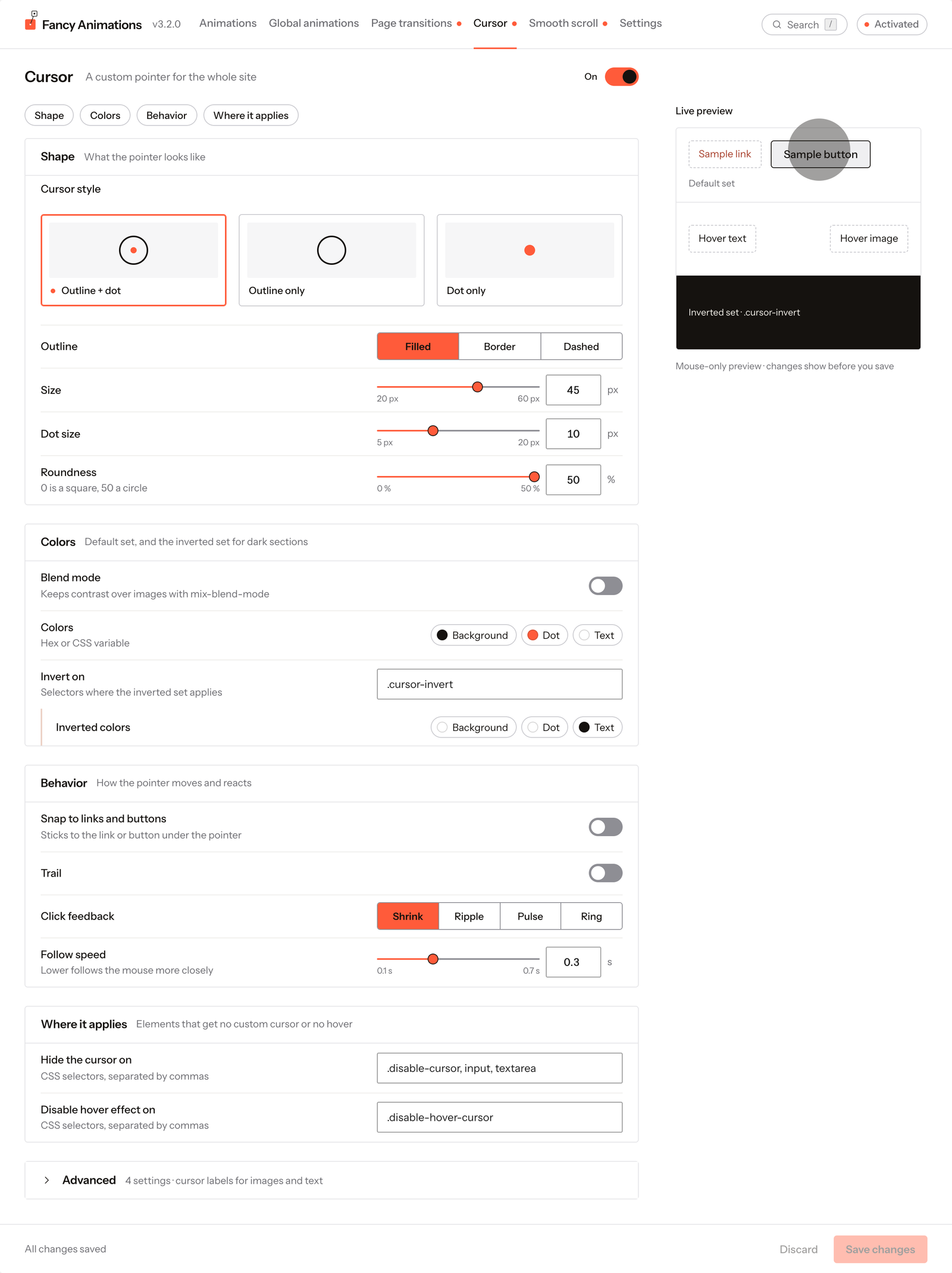
On the site, the custom cursor never runs on touch devices, below the "Skip animations on screens narrower than" width, or inside the Bricks or Etch builder canvases. Use the live preview here, or the published front end with a mouse.
See it live: Custom cursor on fancyanimations.com.
Shape
| Setting | Options | Default |
|---|---|---|
| Cursor style | Outline + dot, Outline only, Dot only | Outline + dot |
| Outline | Filled, Border, Dashed | Filled |
| Rotate dashes (Dashed only) | On/off | Off |
| Size | 20–60 px | 45 px |
| Dot size | 5–20 px | 10 px |
| Roundness | 0–50 % (0 is a square, 50 a circle) | 50 % |
With Dot only there's no outline: Outline, Size, Snap to links and buttons, Trail and the image and text labels don't apply, and are shown disabled with "Not used with Dot only". With Outline only, Dot size is disabled.
Colors
| Setting | Default | Notes |
|---|---|---|
| Blend mode | Off | Keeps contrast over images with mix-blend-mode |
| Force black & white (with Blend mode) | On | Overrides the colours below |
| Colors | Background #15120F, Dot #FF5B3A, Text #FFFFFF | Hex or a CSS variable |
| Invert on | .cursor-invert | Selectors where the inverted set applies |
| Inverted colors | Background #FFFFFF, Dot #FFFFFF, Text #15120F | Used over elements matching "Invert on" |
Behavior
| Setting | Options | Default |
|---|---|---|
| Snap to links and buttons | Sticks to the link or button under the pointer | Off |
| Trail | On/off | Off |
| Trail length (with Trail) | Light, Medium, Strong | Medium |
| Click feedback | Shrink, Ripple, Pulse, Ring | Shrink |
| Follow speed | 0.1–0.7 s; lower follows the mouse more closely | 0.3 s |
Where it applies
| Setting | Default |
|---|---|
| Hide the cursor on | .disable-cursor, input, textarea |
| Disable hover effect on | .disable-hover-cursor |
Advanced
A collapsed section with the defaults for the per-element image and text labels (see Custom cursor (per element)):
| Setting | Default |
|---|---|
| Image label size | 200 px (50–600) |
| Image aspect ratio | 1 / 1 (width / height, for example 16 / 9) |
| Image corner radius | 20 px |
| Text label size | 20 px |
These are all editable: on a given site, check the values actually configured rather than assuming the defaults above.
Common problems
- Nothing shows up while testing in the builder. The custom cursor never loads inside the Bricks or Etch canvas, by design. Use the live preview on this screen, or the published front end.
- The cursor disappears over a form field. Inputs and textareas are in "Hide the cursor on" by default.
- A section needs a lighter or darker cursor than the rest of the site. Add the class from "Invert on" to that section.
- Some settings are greyed out. The cursor style is Dot only (or Outline only, for Dot size): those settings don't apply to it.