
Mouse animations
Interactive animation for WordPress that follows the mouse
Interactive animation used to need its own script on every page. Now you pick follow, move or 3D tilt in the Mouse Animations panel, and the element answers the pointer.
What you can do
Three ways to answer the pointer
Mix them on different layers for depth.
Follow
It drifts after the pointer and turns a little.
Move
It shifts toward the pointer, without turning.
3D tilt
It tilts toward the pointer.
Every preset
Three ways to answer the pointer
One per element, plus two switches that work with any of them.
Animations 3
Mouse Follow
Mouse Move
Mouse 3D
Switches 2
Mouse BounceWith Follow
I am innerInside Mouse 3D
Here a pointer of our own moves them. On your site they answer yours.
How it works
Pick the layer, then how it answers
Mouse Animations has its own panel in Bricks, in Etch and in the block editor.
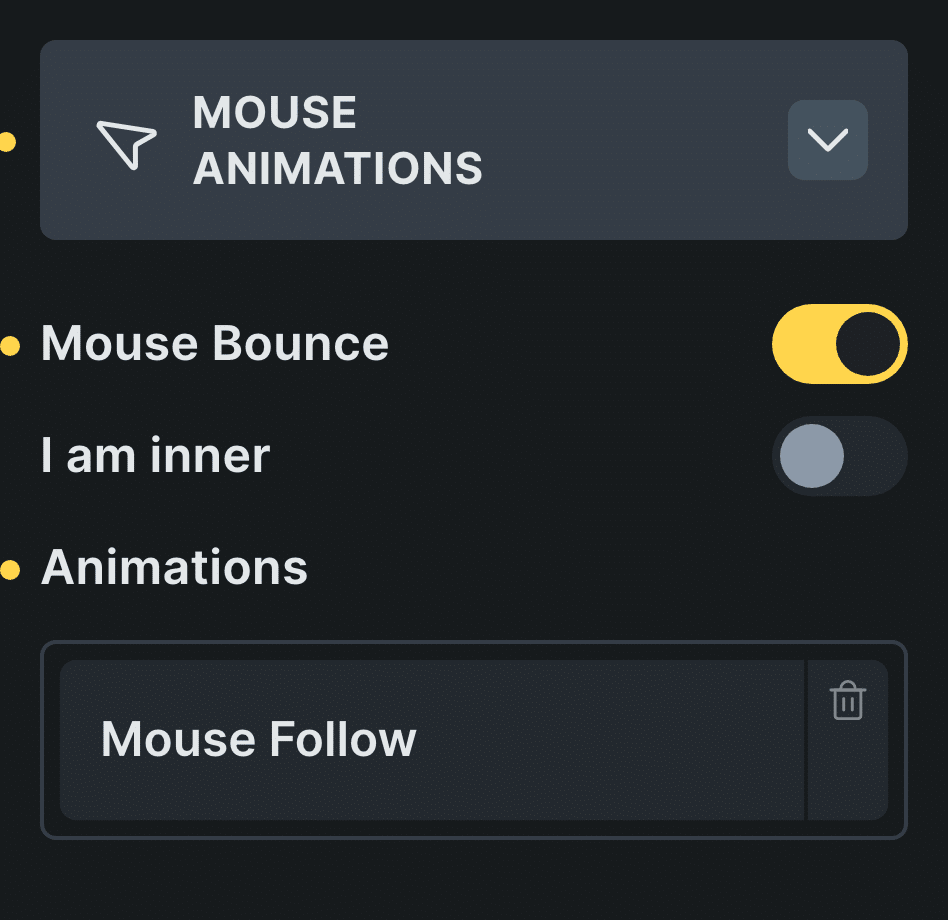
Real capture of the panel in Bricks, in Bricks’ own colors.
Pick the layer
An image, a shape or a whole group.
Open Mouse Animations
It sits in the element’s settings.
Choose the motion
Add Mouse Bounce for a softer stop.
Control: Mouse Bounce
In Etch the same settings live in the Fancy panel, and in the block editor in the block sidebar.
Every setting
Every setting in the panel
Turn Mouse on in the plugin settings once, then use Mouse Animations on any element.
Animations
Follow, move or 3D tilt. One per element.
Mouse FollowMouse MoveMouse 3DMouse Bounce
Eases to a stop instead of snapping when the pointer stops.
I am inner
For a layer inside a Mouse 3D element: it moves in depth with its parent.
Follow mouse
How a follow mouse effect works
The page reads the pointer position and moves the element toward it, a little behind, so it feels like it follows rather than sticks.
Put different speeds on different layers and the section gains depth: the background barely moves, the foreground moves most.
Read how to set it up in the docsBefore and now
What it took before, and what it takes now
Pointer effects are fun until you maintain the script.
Beforea script per page
- Not included:A pointer script on each page
- Not included:Speeds tuned in code
- Not included:Different code per builder
Nowwith Fancy Animations
- Not included:Follow, move or 3D tilt in the panel
- Not included:Mouse Bounce for a softer stop
- Not included:The same settings in Bricks, Etch and the block editor
What happens on phones?
Nothing moves: there is no pointer to follow.
Does it work in the block editor?
Yes. Mouse Animations is one of the six panels in the block sidebar.
Can I make it subtler?
Yes, with your own CSS on the element, without touching the plugin.
Add mouse animations to your next site
From $148.57 instead of $179, one payment, every update for life. 14-day refund.