
Global animations
Global animations for every heading, card or section, set once
Global animations add an entrance or a text animation to every element that matches a CSS selector, on every page of the site. Before, the same fade went on each heading by hand, page after page. Now one rule covers every h2 or every card, and what you animated in the builder keeps its own settings.
What you can do
One rule, every match
A rule is a selector and an animation. The plugin finds the matches on every page.
Section title
Every heading
A rule for section titles animates them on every page.
Every word enters on its own
Text by words
A text rule splits by letters, words or lines.
- RuleIts own
Builder settings win
An element animated by hand keeps its own animation.
- RuleSkipped
Skip what you exclude
Matches inside an excluded area stay still.
How it works
Rules live in the plugin settings
Write a selector, pick an animation and save. It works on every page, whatever builder or theme made it.
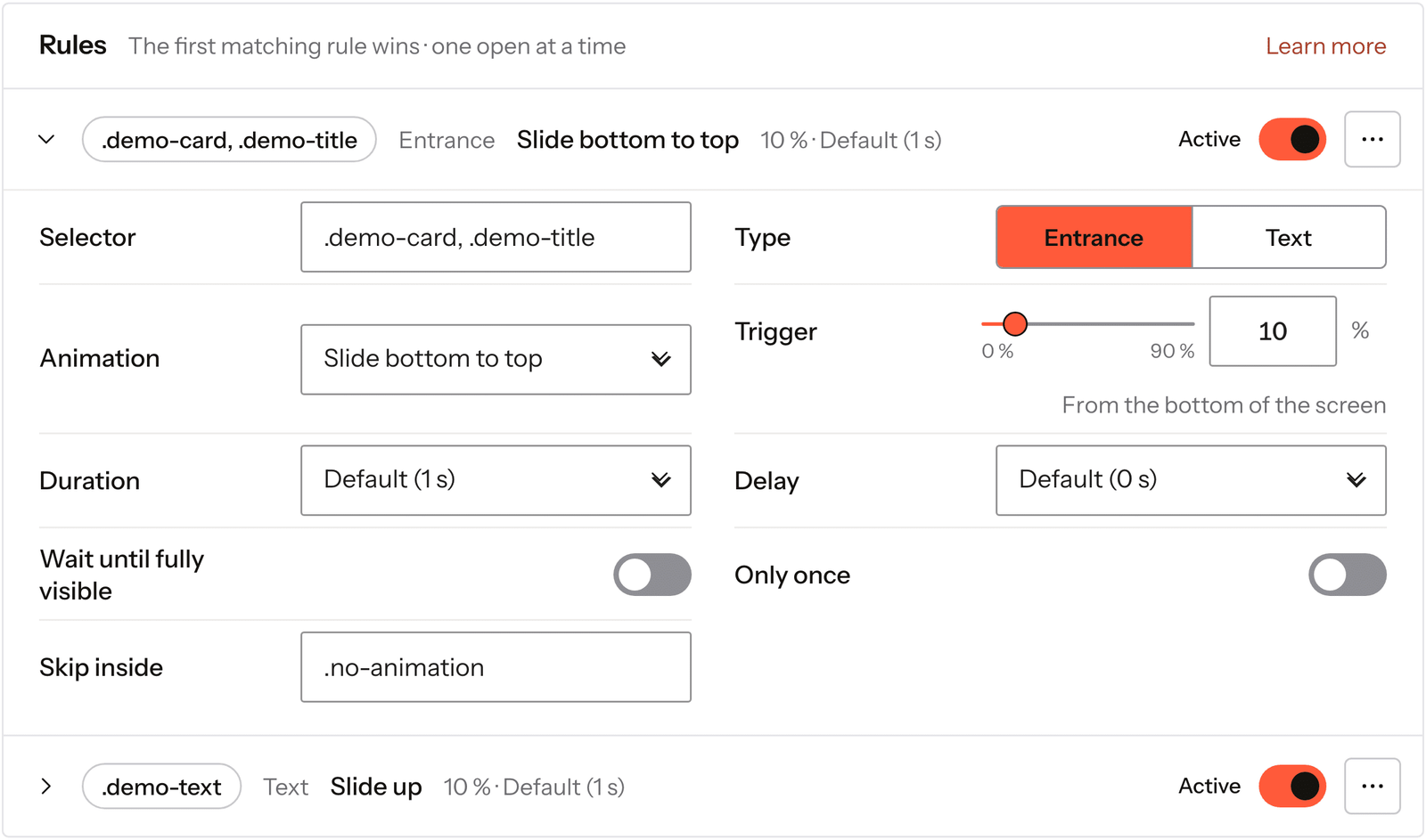
Real capture of the Global animations screen in the plugin settings, with this page’s rule open.
Open Global animations
In Fancy Animations, in your WordPress admin.
Add a rule
A selector such as h2 or .card, and an entrance or text animation.
Save
Every match on every page animates from then on.
Rules run on the published page, so they match elements from any builder or theme.
Every setting
Every setting in the panel
Each rule has its own settings, and one more field applies to every rule.
Selector
Any CSS selector, with presets for common tags.
h1–h6pimg.your-classType
An entrance or a text animation. Text needs the Text module.
EntranceTextAnimation
Any entrance or text preset of the plugin.
Split by
Text rules only.
LettersWordsLinesTrigger
How far up the screen the element comes before it plays, from the bottom.
0 % to 90 %Duration and delay
Per rule, or the defaults from the Animations screen.
Wait until fully visible
It plays once the whole element is on screen.
Only once
It plays the first time only.
Skip inside
Matches inside these selectors are left alone by this rule.
.heroNever animate inside
The same, for every rule at once.
footer.no-animation
What wins
Your builder settings come first
An element that already has a Fancy animation from the builder is left alone, and so is anything ScrollTrigger drives or anything inside an animated text.
When two rules match the same element, the first one in the list wins. You can reorder rules, switch one off without deleting it, and keep areas such as the footer out of every rule at once.
Read the docs on global animationsBefore and now
What it took before, and what it takes now
Animating one kind of element across a site meant doing it page by page.
Beforeby hand in the builder
- Not included:The same animation set on every heading, page by page
- Not included:A change of mind meant editing every page again
- Not included:Pages added later arrived without it
Nowwith Fancy Animations
- Not included:One rule per selector, for the whole site
- Not included:Change the rule once and every page follows
- Not included:New pages pick it up as soon as they match
Does it work with Etch and the block editor?
Yes. Rules run on the published page, so they match elements from any builder or theme.
What if an element already has an animation?
The rule skips it. Settings from the builder always win.
Can a rule add a stagger?
No. A rule gives every match the same animation. For a cascade, use Stagger on the parent in the builder.
Can I keep the header or footer out of it?
Yes. Never animate inside skips those areas for every rule at once.
Add global animations to your next site
From $179, one payment, every update for life. 14-day refund.