
Gradient background animations
Animated background for WordPress that follows the cursor
This animated background for WordPress puts a soft radial gradient behind a section and moves its focus with the cursor. Add a pattern on top and let it drift on its own. All of it from the panel.
What you can do
Three layers you can mix
Start with the gradient, then add a pattern if the section needs texture.
Follows the cursor
The focus moves with the pointer.
Radial size
How wide the soft light spreads.
Moving pattern
Dots or lines that drift on their own.
Every preset
Four patterns, or none
One pattern per section, on top of the gradient.
Pattern 5
None
Net
Dots
Line
Diamond
Pattern motion 5
CenterStill
Left
Right
Top
Bottom
Here the light drifts on its own. On your site it follows the cursor.
How it works
Turn it on, then pick two colors
Gradient background animations have their own panel in Bricks.
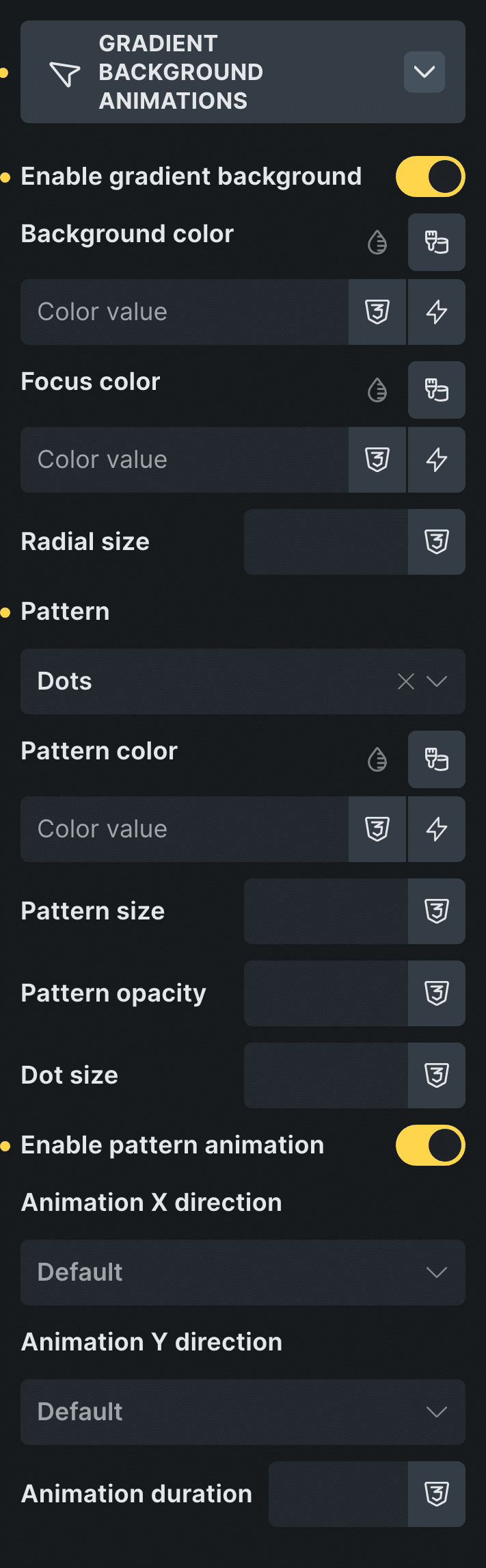
Real capture of the panel in Bricks, in Bricks’ own colors.
Pick the section
Select the section that should get the background.
Turn on Enable gradient background
Then choose the background color and the focus color.
Control: Enable gradient backgroundAdd a pattern if you like
Pick a pattern and turn on Enable pattern animation to make it drift.
Control: Enable pattern animation
In Etch the same settings live in the Fancy panel, and in the block editor in the block sidebar.
Every setting
Every setting in the panel
Gradient background animations works on sections, containers, blocks and divs.
Enable gradient background
Turns on the soft light that follows the cursor.
Background color / Focus color
The base color and the color of the light.
Radial size
How wide the light spreads.
Pattern
Net, dots, line or diamond, with its color, size, opacity and dot size.
NoneNetDotsLineDiamondEnable pattern animation
The pattern drifts on its own, in the direction you pick.
X: Center, Right, LeftY: Center, Bottom, TopAnimation duration
How long one drift takes. 20s by default.
Radial gradients in CSS
A radial gradient with a moving center
A radial gradient fades from one color at its center to another at the edge. Move the center and the light moves with it.
The plugin moves that center with the cursor and leaves the rest to CSS. On phones there is no cursor, so it rests in its default position, and a tap moves it once.
Read how to set it up in the docsBefore and now
What it took before, and what it takes now
Moving backgrounds used to mean a canvas or a heavy library.
Beforecanvas or a library
- Not included:A canvas script or a background library
- Not included:Code to follow the pointer
- Not included:Extra work to keep phones calm
Nowwith Fancy Animations
- Not included:Enable gradient background in the panel
- Not included:Background and focus colors as settings
- Not included:On phones it rests, and the pattern keeps moving
What happens on phones?
It rests in its default position. A tap moves it once, and the pattern animation keeps running.
Does it need code?
No. The colors, the size and the pattern are all settings in the panel.
Add a moving background to your next site
From $179, one payment, every update for life. 14-day refund.