

If you build in Bricks, you can skip the code: scroll animations are a setting in the panel. This guide is for understanding what happens underneath — and for sites that are not built in Bricks at all.
Scroll animations in CSS and HTML: what actually moves when the page scrolls
Until scroll-driven animations landed, CSS had no way to react to the scroll on its own: something had to turn scroll position into a value the style could use — a class that gets added, a custom property that gets written — and that is still the compatible way to do it today. Newer browsers can also keep a scroll timeline themselves. Either way, the motion is ordinary CSS.
Three ways to animate on scroll: a CSS class toggled by a script, CSS scroll-timeline, or full JavaScript
| Approach | What drives it | Where it falls short |
|---|---|---|
| Class toggled by a script | IntersectionObserver adds a class when the element appears | Plays once; it does not follow the scroll |
| CSS scroll-timeline | The browser ties keyframes to scroll progress | Support is still partial; needs a fallback |
| Full JavaScript | Your code reads scroll position every frame | Most work, and the easiest to make janky |
CSS scroll-driven animations with animation-timeline: scroll() and view()
With animation-timeline the browser drives the keyframes from the scroll itself. view() runs the animation while the element crosses the screen; scroll() follows the whole page.
@keyframes reveal {
  from { opacity: 0; translate: 0 40px; }
  to   { opacity: 1; translate: 0 0; }
}

.card {
  animation: reveal linear both;
  animation-timeline: view();
  animation-range: entry 0% cover 40%;
}
It is the cleanest version of a scroll animation — no script at all — and the catch is support: it is not in every browser your visitors use yet, so plan what happens where it is missing.
JavaScript scroll: IntersectionObserver vs scroll events, and when a script is still needed
For a reveal that plays once, an IntersectionObserver is enough and cheap: the browser tells you when the element enters the screen, and you add a class.
const io = new IntersectionObserver((entries) => {
  entries.forEach((e) => {
    if (!e.isIntersecting) return;
    e.target.classList.add('is-in');
    io.unobserve(e.target);   // plays once
  });
});
document.querySelectorAll('.card').forEach((el) => io.observe(el));
For motion that follows the scroll — a sticky scene, a card stack, a video that scrubs — you need the scroll position itself, read on every frame and written into a custom property the CSS reads back.
Scroll down animations: reveals, fades and indicators that fire as the page moves
The everyday case is a reveal: fade, slide or zoom, once, as the element arrives. Keep them short and keep the content in the HTML. Fade, slide and zoom reveals are the same shape underneath — transform and opacity, driven by a class — while a mask reveal animates clip-path instead.
SVG animation on scroll: move, scale and reveal vector graphics (path drawing is not included)
An SVG is an element like any other: it moves, scales and reveals on scroll the same way. What is a different job is drawing a path — animating stroke-dashoffset so a line draws itself. Fancy Animations does not do that one; it needs its own CSS.
Build it in Bricks without code: ScrollTrigger classes with from/to, start/end, parent and a CSS-sticky stage
Do it without code
The same three approaches, as panel settings
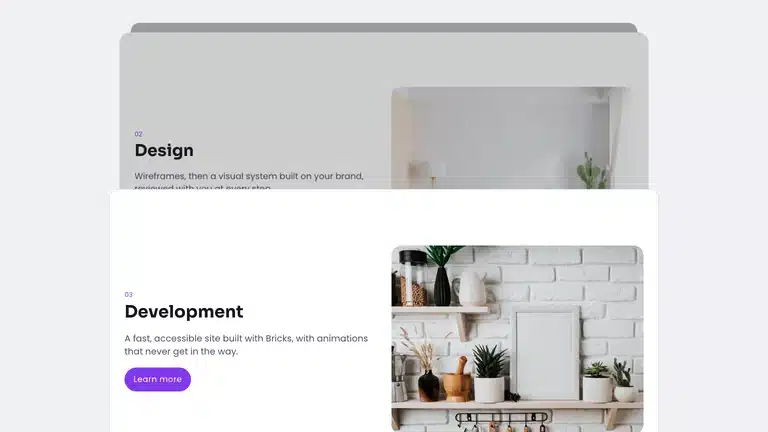
In Bricks the reveal, the scroll-driven motion and the sticky scene are all controls: pick an animation, set from and to, start and end, and tick Covered by next sibling for a sticky card stack, or Sequence children when children should take turns. The stage itself you pin with CSS position: sticky.
Control: from / to, start / end
Animations without GSAP: a lighter alternative and what you give up
GSAP with ScrollTrigger is a timeline engine: sequencing, easing curves, scrub, snap, complex scenes choreographed in code. What most sites actually need is a few reveals and one sticky scene. Fancy Animations covers that with CSS and two small scripts, about 10 KB gzipped together, from the panel.
What you give up is the timeline: if your scene needs several elements choreographed against each other in code, a library is still the right tool — beyond what Sequence children and stagger already cover.
Scroll animations and Core Web Vitals: the pitfalls that cost you
Three things cost real points, and all three are avoidable. Content hidden by default and revealed by script: if the script is slow or blocked, the page is empty. Layout shift: animating width, height or top makes the browser lay the page out again — animate transform and opacity instead. Main-thread work: heavy per-frame JavaScript competes with everything else the page is doing.
Browser support: why Fancy Animations does not depend on experimental CSS
animation-timeline is the future of this, and it is not evenly supported yet. A plugin that relied on it would work beautifully in some browsers and not at all in others, so Fancy Animations drives CSS with its own small script: the same result everywhere, today.
Go further: scroll animations for Bricks, Etch and Gutenberg
Scroll animations shows every control live, sticky scenes and stacked cards is the scene people ask for most, and the template library has them built.
What is it called when a website moves as you scroll?
Scroll-driven or scroll-triggered animation; when layers move at different speeds it is called parallax. This guide covers the CSS and JavaScript behind both.
Can I do scroll animations with CSS only?
Yes, with animation-timeline: scroll() and view(), but browser support is still uneven. A tiny script that toggles classes or sets a CSS variable works everywhere today.
Is GSAP the best animation library?
It is the most complete, but most Bricks sites need a few reveals and a sticky scene, not a timeline engine. CSS plus two small scripts, about 10 KB gzipped together, covers that without the weight or the learning curve.
Do scroll animations hurt SEO or Core Web Vitals?
Only when content starts hidden, layouts shift or heavy JavaScript blocks the main thread. Keep content visible by default, animate with transforms and opacity, and keep scripts small.
Can I animate an SVG path drawing itself on scroll?
Not with Fancy Animations: it moves, scales and reveals SVG like any element, but stroke-dashoffset drawing needs custom code. The guide shows where that line is.
How do I start a scroll animation in Bricks without writing code?
Add the Fancy Animations ScrollTrigger controls to the element: from and to values, start and end positions, and position: sticky on the stage if you need a pinned scene.